
Contact Us

Blog
You can code, and you don’t even know it.


by Jordan Crompton
October 13th 2021

Part 1 of the “you can code” series.
If you’ve spent any time at all following our online presence you’ll quickly be familiar with one of our core beliefs: Anyone can code. So, let’s take a journey together to prove it, and more importantly, let’s code.
Are programming languages ‘really’ languages?
Yes, and no, seem confusing? Don’t worry.
In a broader sense they are languages, but from a purely linguistic perspective only those that naturally stem from our inherent need to communicate with each other are actually definable as ‘languages’.
“But I’ve been told it can be like learning a second language? Are you telling me that’s a lie?” Absolutely not, though not qualifying as a language from a linguistic standpoint there are still incredibly close similarities between learning to code, and learning a second language.
Let’s take a closer look, and humanise code a touch.
Both are used to tell stories, or create a narrative
When we take the plunge and decide to learn a new programming language we must first understand its syntax, syntax is both the structure and the grammatical rules. This is the same for a ‘traditional’ language in that we first start with basic vocabulary to string together simple sentences. Once we are more comfortable with a programming language's syntax we can begin breaking down complex problems, just as simple sentences are turned into engaging conversations. From there, we change the world - creating moving monologues, and beautifully complex ‘narratives’.
An argument can be made here that it is easier to pick up a programming language than it is to learn a foreign, or second, language - ‘traditional’ languages can take years to reach a relative level of proficiency enough to bring you confidence in a social setting, yet we can spend a fraction of that time focused on a given programming language and sooner reach the point of putting it into real world practise with a relative level of expertise. So, what's stopping you?
Both require breaking down problems into smaller, digestible, chunks
When we learn a new ‘traditional’ language the idea of structuring long sentences can be quite daunting, and realistically borderers impossibility. For this reason we break down these ‘problems’ into smaller pieces, solving each one at a time, and then bringing it back together for the final solution. This is exactly the same when we write code; what may start as a complex problem is broken down into smaller chunks of logic, each contributing to the bigger picture and thus solving the problem at hand.
Code may look a little more complicated at first glance, some languages may not follow the typical syntax of ‘traditional’ languages, and it may be a touch unambiguous. For these reasons we first focus on syntax, and build. So, don’t be phased - you got this.
Mistakes make us stronger, experiment to your heart's content
We all learn differently, some are visual, others are auditory, then we have those who are kinesthetic learners, and finally the readers and writers. It doesn’t matter which category you fall under, when it comes down to it it's always easier to put things into practise, with your own spin of course. Programming and language are no different in this scenario, practical application will accelerate you further, faster. Want to benchmark your current French fluency? Head out, speak to people, even write a few pages and have it peer assessed. Want to do the same for your coding competency? Write a program, create and solve a problem, publish it to GitHub or even ask for feedback on Stack Overflow/Reddit. The choice is yours as the world is your oyster, practise makes perfect - only when we make mistakes, hit a wall, and overcome it do we truly further our understanding, oh and never be too proud to ask for help… we work better as a collective brain.
Now, we could go further but I like to think this is illustrative enough. Let’s get our teeth into some code.
Enter: JavaScript
There are many fantastic programming languages you could choose, Python being another popular choice at a beginner-intermediate level, but for this series of tutorials and code-alongs we will be focusing primarily on JavaScript.
Why, you may ask?
The 2020 Stack Overflow Developer Survey reported that Javascript stands as the most commonly used language in the world (in at 69.7%)
JavaScript is for the web (though not exclusively), with pretty much all browsers utilising it
It’s easy to learn and it’s super ubiquitous (seriously, it’s everywhere - handy when you need resources for learning) due to it’s popular use-cases
There may be one last lingering thought in the back of your mind: “Oh, I’ve played around with a little Java, I’m sure it’s similar” well, that’s where it can be a little confusing. Though they share a name, to an extent, they’re entirely different - Chris Heilmann summerises it well - “Java is to JavaScript what Car is to Carpet”.
Step 1: Visual Studio Code
First you’ll need an integrated development environment (IDE), at Code Nation we use Visual Studio Code - but it isn’t just us, roughly 70% of professional developers also use VSC. Oh, and it’s developed by Microsoft.
Visual Studio Code documentation
Visual Studio Code download page
Having trouble setting up Visual Studio Code? Here’s a guide from medium.
Step 2: Installing Node
Node is supported by the OpenJS Foundation, contributing members of which include Google, Microsoft, IBM, and GitHub.
More in depth information surrounding Node can be found here, but to keep things simple Node is an open source development platform which executes JavaScript code on the server-side of things, by installing the package locally on our machines we’re able to both write and execute JavaScript on our development machines before it ever finds itself on a server.
Node installation guide courtesy of GitHub
Step 3: Creating your first JavaScript file, and executing it
Now that we have both our IDE and Node installed we can get started.
First we need to set up a directory where we would like to keep our development work, this is different for everyone and it really comes down to your own personal preference. If we’re thinking long term I’d suggest something along the lines of:
Desktop -> Development -> Name of project
It doesn’t have to be on your desktop, but there is a reasoning behind ensuring that each project is neatly stored in it’s own folder: git and GitHub. Down the road the chances are you’ll be creating repositories on GitHub to either store, showcase, or to open up your projects to others.
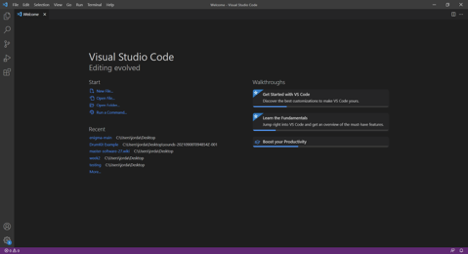
Once you’ve created your folder, open up Visual Studio Code and you’ll be greeted by the following:

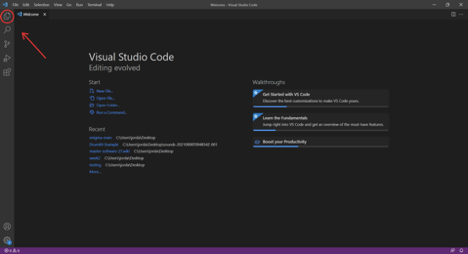
Once the Explorer panel opens select “Open Folder” and locate the development folder we created earlier, it should look something like this once finished:
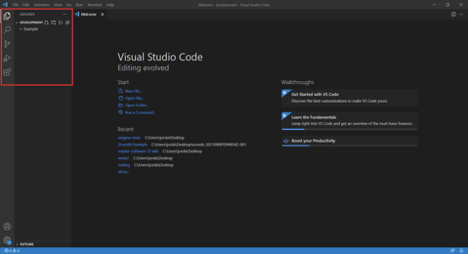
Now that we have opened up our development folder, we can create a new file inside. In my example my project is called ‘Example’, yours may be different but this is where we’ll create our JavaScript file - to do this right click your project folder, and select “New File”. Once the file has been created we will need to give it a name, let’s call ours “hello.js” (the .js extension is important, this defines the JavaScript file type):
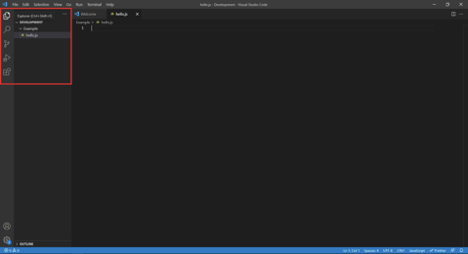
You’re done, now let’s write some code!
We’re going to start by writing a simple “Hello World” program, I know I know… this is done time and time again, but really I just want to familiarise you with executing via Node before we do something a little more fun.
console.log("Hello World");
That is all the code we need for this step, here we are using the console object and it’s log method to display the string “Hello World” in the console.
In order to display the console, find the “View” option at the top of Visual Studio Code, and then select “Terminal” - if you prefer a keyboard shortcut just hit Ctrl+’ on Windows, or control+` on MacOS.
Ensure that your hello.js file is saved, and then in the new terminal window type (replace nameOfProject with the name of your project folder:node nameOfProject/hello.js
Followed by the enter key, like so:

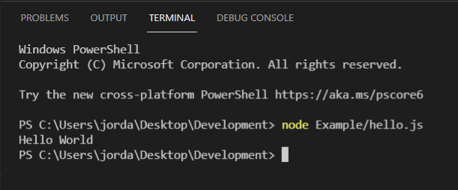
See the “Hello World” output under “Node Example/hello.js”? If you see it, you’ve just executed your first line of code. Nice!
Now for something more fun, let’s take a problem and break it down into pieces, and from those pieces write some code.
Problem #1:
We have time in minutes, but we need it to display and output in seconds. Let’s break this down:
Each minute is a collection of 60 seconds
Meaning if we have 3 minutes it would be 180 seconds
In order to write code for this problem we need to understand a few basic principles, the first being variables. A variable is basically a container which stores information, for example in our problem we need to store both the amount of minutes and also seconds - numbers are integer values. To declare a variable we use the let, or const, keywords:
let minutes = 0;
let seconds = 0;
Bonus point: What is the difference between let and const? Next we need to change the value of seconds to store the sum of the equation: minutes * 60, and lastly we need to output the new value of seconds to the console like before:
seconds = minutes * 60;
console.log(seconds)
All together your code should look like this:
let minutes = 10;
let seconds = 0;
seconds = minutes * 60;
console.log(seconds);
And we should see “600” in the terminal panel after executing the JavaScript.
Simple, right? Now can you expand the solution above to accommodate for hours too?
Keep it simple, how many seconds in an hour? How many seconds in a minute? Calculate both and add them together for a final output.
Problem #2:
Functions allow us to package blocks of code up so that we can use them multiple times without repeatedly typing out the same logic over, and over again. Let’s use one.
We have two numbers, one of which is larger than the other. Our program must be able to identify which number is larger, and output it to the console.
// function declaration
function compareNumbers() {
}
// function call
compareNumbers();
In the above code a function is declared using the function keyword, this function is then called using just it’s name below. When we call a function, we execute it - the brackets are super important, pay attention to syntax.
When declaring a function we are able to pass it information as a parameter, for example we need to compare two numbers and it only makes sense that we give the function two numbers to work with i.e. number1 and number2:
function compareNumbers(number1, number2) {
}
In order to test these numbers against each other we will need to use a conditional test, in this case we’ll use an if statement. An if statement will run a test based on our given criteria and return true or false, a little bit like this:
if (1 > 5) {
    // do this if true
} else {
    // do this if false
}
If 1 is more than 5, do this, otherwise do something else if it’s false. Let’s make this relevant for us:
function compareNumbers(number1, number2) {
    if (number1 > number2) {
        console.log(number1);
    } else {
        console.log(number2);
    }
}
If number1 is larger than number2 it will execute a console.log for number1, otherwise number2 must be bigger and therefore it will output number2.
Now we need to pass the numbers to our function, and call it.
Here the number 6 is passed to number1 and 7 to number2. Logically number 7 is the largest of the two numbers, and therefore 7 should be output. Your completed code should look as follows:
// function declaration
function compareNumbers(number1, number2) {
    if (number1 > number2) {
        console.log(number1);
    } else {
        console.log(number2);
    }
}
// function call
compareNumbers(6, 7);
And as if by magic, you should see the number 7 being output! This may still seem simple, but you’ve just tackled two tough fundamentals: conditional testing, and functions. Nice work!
Problem #3:
It’s time for a challenge, can you combine problem 1 and problem 2, but with a twist?
I’d like you to:
Take two numbers, which are in seconds
Convert those numbers to minutes
Compare them against each other
Output the largest number in minutes
The solution is below the following image, so for now please don’t scroll - try this for yourself, believe me it’s easier than you think. Step by step, piece by piece - you got this:


****** SOLUTION ******
// function declaration
function compareNumbers(number1, number2) {
    // convert to minutes
    number1 = number1 / 60;
    number2 = number2 / 60;
    // compare both converted numbers
    if (number1 > number2) {
        console.log(number1);
    } else {
        console.log(number2);
    }
}
// function call
compareNumbers(600, 720);
There are many ways to do this, the above is just one easy to read example. Bonus reading: using return
Problem #4:
In this problem we have a series of drinks, these drinks need to be arranged in alphabetical order before we use them.
Let’s break it down, whilst considering what we know so far:
We know that data is stored in variables
We know what functions are, and how to run a simple conditional test
So we could combine the two and get creative, no? Well, yes we could but there’s an easier way. Something beautiful about mature programming languages is that they have plenty of embedded functionality, including libraries, that we can make use of - they’re there to streamline and simplify problem solving for us, basically saving us time (something pre-exists for most repetitive tasks, do a little research).
In this case we have the sort() method, so let’s rethink:
We have a list of drinks
We need to sort them into alphabetical order
We can use the sort() method to achieve this
Now, how do we store that data to begin with? A variable per drink? Nope, enter: Arrays.
Arrays are essentially lists, declared similarly to the variables previously discussed:
//An array which is empty
let outDrinks = []
// An array with items
let ourDrinks = ["Cola", "Lemonade", "Bottled Water", "Tap Water", "Lime Cordial"];
Okay, fantastic! We can store lists, but how do we access this information?
console.log(ourDrinks[0]);
console.log(ourDrinks[1]);
console.log(ourDrinks[2]);
console.log(ourDrinks[3]);
console.log(ourDrinks[4]);
Array items start from a 0 index, meaning that 0 represents the first item, 1 being the second, 2 the third, and so on.
Okay, so back to our problem:
let ourDrinks = ["Cola", "Lemonade", "Bottled Water", "Tap Water", "Lime Cordial"];
console.log(ourDrinks);
ourDrinks.sort();
console.log(ourDrinks);
//Output should look like this:
[ 'Cola', 'Lemonade', 'Bottled Water', 'Tap Water', 'Lime Cordial' ]
[ 'Bottled Water', 'Cola', 'Lemonade', 'Lime Cordial', 'Tap Water' ]
This array contains all of our drinks, and now to sort them correctly.
In order to ‘run’ the sort() method we need to use dot notation, which is exactly the same as we’ve been using with console.log - in this case console is the object, and log() is the method (function) belonging to the object.
So the logic here is that we need to access ourDrinks, and then use the sort() method. In order to show that the list has been organised we first output the entire array to the console, use the sort() method, and then output the same list a second time.
Before we continue I’d like to pause and applaud you, though these problems may appear simple, let's actually appreciate how far you’ve come. You may have never coded before, and in no time at all you’ve experimented with functions, conditional testing, and arrays (and let’s not forget methods) - these are coding fundamentals, and that’s a pretty big deal.
Problem #5:
It’s closing in on Christmas, and when it’s time we love nothing more than an excuse to put up the tree and more importantly put out a carrot for Rudolph.
Here’s the problem:
Write a program that takes today's date, and checks to see if it’s time to put out Rudolph’s carrot, or put up the tree (two different days for most, cheeky right? Guess we’ll have to check both)
“It’s time” or “it’s too early”, or equivalent, should be output in the console
Hint: honestly just google for “comparing dates in JavaScript”, or even take a look at the Mozilla reference sheet for Date(). This is totally valid research in 2021, don’t be afraid.
The last problem is for you, research if needed, or reach out to us - just remember, you got this and more importantly than anything else: you can code. Don’t just take my word for it, you’ve installed VSC, and Node, and have solved a series of problems using code which may have previously appeared to have been an alien language.
Further reading:
More on:
In conclusion:
You can code.
It’s that simple.
Stay tuned for part 2, fellow coder.
WRITTEN BY
Jordan Crompton
Front-End Developer and XR Lead
Jordan works as a front-end developer on our Master Software (JS) course and also leads our courses in Extended Reality using the Unreal game engine.
Click here for all posts by Jordan.
Follow Us





Tel. 0333 050 4570
Code Nation © 2021 | Privacy Policy | Terms of Service
Code Nation is a registered trademark, all rights reserved.
Website made using:


